Automating month-end close replaces manual reconciliations and status-chasing with rule-based matching and exception review, typically shrinking a close cycle by half within a quarter. The single best next step: pick one high-volume account and run a 30-day automation pilot before touching anything else.
Start this week with:
- Bank and card reconciliation rules for your highest-transaction accounts
- Recurring journal entry templates for accruals, depreciation, and prepaids
- A shared, interactive close task checklist with owners and due dates
Pro Tip: Choose an account with stable, predictable transaction patterns for your pilot — messy accounts belong in phase two, not phase one.
Teams that redesign their close around continuous accounting and automation frequently cut close time roughly in half within a single quarter, shifting analyst time from building numbers to validating them.
Key Takeaways
Automating month-end close cuts cycle time by starting with a narrow, high-volume pilot, then expanding to exception-based review as data quality and governance mature.
| Point | Details |
|---|---|
| Start with one account | Pilot reconciliation automation on a high-volume, stable account before expanding further. |
| Expect roughly 50% faster closes | Teams that adopt continuous accounting often halve close time within a quarter. |
| Require auditability | Insist on living work papers, role-based access, and immutable logs before signing a contract. |
| Data quality comes first | Standardize your chart of accounts and reconcile one full cycle manually before automating. |
| Aidventure runs pilots for SaaS teams | Aidventure’s accounting operations services scope and manage the 30-day pilot model described throughout this guide. |
Table of Contents
- Why Automate the Month End Close Process?
- Which Month-End Tasks Should You Automate First?
- What Software Features Actually Matter for Close Automation?
- What Does a Realistic 90-Day Rollout Look Like?
- Why Do Close Automation Projects Stall or Fail?
- How AidVenture Guided a SaaS Startup Through a Close Automation Pilot
- How Do You Prepare Data Before Automating the Close?
- How Do You Keep Controls and Audit Trails Intact After Automating?
- How Do You Get Your Accounting Team to Adopt New Automation Tools?
- What Risks Should You Plan for When Automating the Close?
- How Do You Evaluate Vendors for Close Automation?
- Get Hands-On Help Implementing Month-End Close Automation
- Frequently Asked Questions
- Sources
Why Automate the Month End Close Process?
Automating the month-end close works because it removes repetitive matching from human hands and routes only genuine exceptions to reviewers. That single shift changes the job description: instead of spending three days ticking and tying, your team spends half a day explaining the five transactions that did not match automatically.
The mechanism is straightforward. Reconciliation software applies matching rules to bank feeds and subledgers overnight. Journal automation posts recurring entries on schedule instead of waiting for someone to remember them. Task orchestration tools track who owns what and flag overdue items before they become a Friday-night scramble.
The measurable outcomes tend to include:
- Faster close (days instead of weeks for routine reconciliations)
- Fewer manual touch points per account, which reduces both errors and overtime
- Cleaner audit trails, since every match and entry carries a timestamp and rule reference
Farseer’s research on continuous accounting found that teams adopting automation and moving work earlier in the cycle often cut close time roughly in half within a quarter. That is a realistic benchmark for planning, not a guarantee. Results depend heavily on data quality and how narrowly you scope the first rollout.
Which Month-End Tasks Should You Automate First?
Not every close task deserves automation on day one. Start with tasks that are high-volume, repetitive, and low on judgment calls. Save the complex, high-risk items for later phases once your team trusts the system.
- Bank and credit card reconciliation. High transaction counts, clear matching rules, and immediate time savings make this the obvious starting point.
- Subledger-to-GL matching. Accounts receivable and payable subledgers rarely need human interpretation when the matching logic is sound.
- Recurring journal templates. Depreciation, prepaid amortization, and standard accruals follow the same formula every month.
- Intercompany reconciliation. Once the basics run smoothly, tackle the harder cross-entity matching that usually eats the most analyst hours.
- Accrual and revenue recognition templates. These require more setup but pay off heavily for subscription businesses tracking deferred revenue under ASC 606.
- Variance and anomaly detection. Automated alerts on unusual account movements catch errors before they compound into a bigger problem.
Once matching runs automatically, build exception routing so only flagged items land on a human’s desk. Everything else should close itself and get logged for review.
- Route mismatches to the account owner, not a general queue
- Set a threshold (dollar amount or percentage variance) that triggers manual review
- Keep a checklist view so managers see progress without asking for status updates
Pro Tip: Pick your pilot account based on stability, not size. A smaller account with consistent transaction patterns will prove the concept faster than a large, messy one.
What Software Features Actually Matter for Close Automation?
The right platform needs to do more than match transactions. It needs to hold up under an audit and scale as your entity structure grows. Here is what to require before you sign a contract:
- Auto-reconciliation with configurable matching rules, not just a static rules engine that breaks the moment your bank changes its statement format
- Journal automation and templating for recurring entries, with version control so you can see who changed a template and when
- Close task orchestration that assigns owners, tracks deadlines, and shows a real-time view of where the close stands
- Anomaly detection that flags variances against prior periods or budget, not just missing matches
- ERP, bank feed, and subledger integrations that pull data automatically instead of requiring manual CSV uploads
- Multi-entity consolidation if you operate more than one legal entity or currency
Every one of these features matters for a second reason beyond speed: auditability. A reconciliation tool that leaves a “living work paper” trail, showing exactly which rule matched which transaction, saves your team hours during an annual audit.
Security and controls are not optional extras. Role-based access, segregation of duties, and immutable audit logs need to be built into the platform before you automate a single journal entry, because automation without controls just moves risk faster.
On integrations, favor API connections over SFTP batch transfers wherever possible. APIs pull data in near real time and reduce the lag between a transaction happening and it showing up in your reconciliation. SFTP still works for legacy subledgers, but treat it as a fallback, not the default.
What Does a Realistic 90-Day Rollout Look Like?
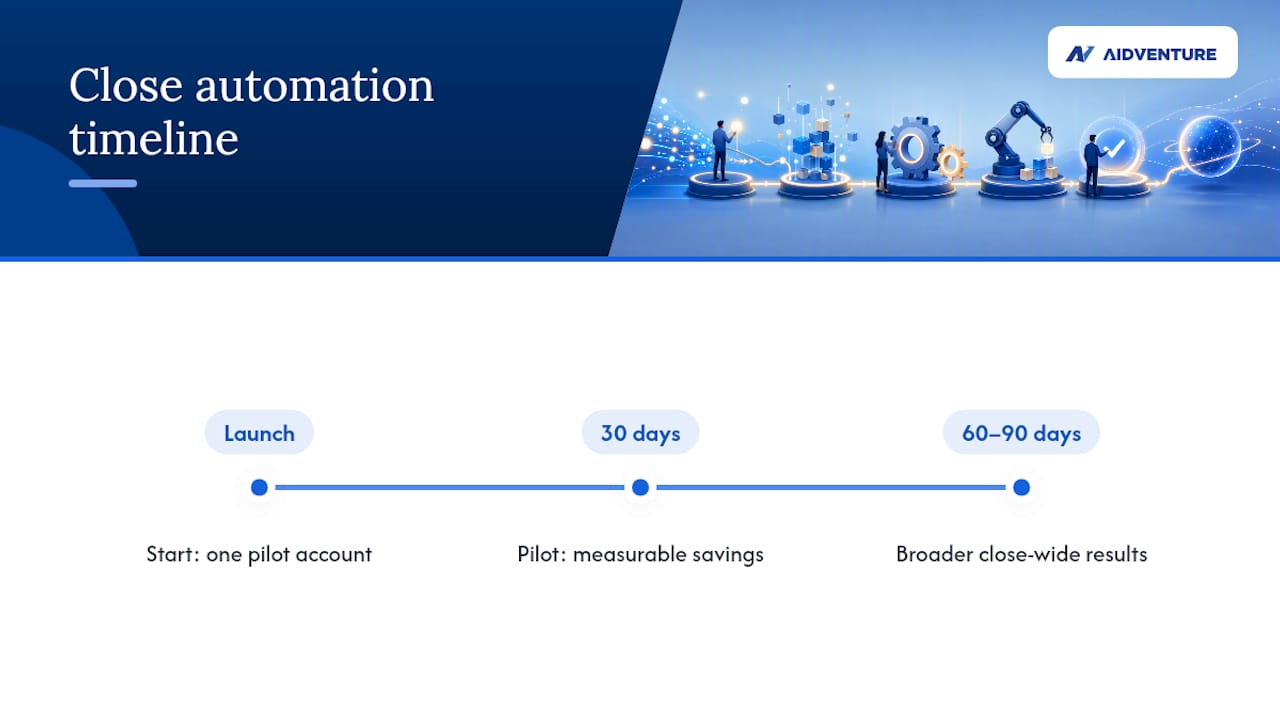
The realistic path is a pilot on one high-impact task for 30 days, expansion to a broader pre-close wave by 60 to 90 days, and a shift to continuous accounting somewhere between six and twelve months out.
- Days 1 to 30: Automate one account’s reconciliation. Assign an owner, set matching rules, and measure hours saved against last month’s manual process.
- Days 31 to 60: Add recurring journal templates and a shared close checklist. Start tracking days-to-close as your primary metric.
- Days 61 to 90: Expand automation to intercompany reconciliation and basic anomaly detection. Formalize weekly pre-close reviews instead of waiting until month-end.
- Months 6 to 12: Move toward continuous accounting, where most reconciliation happens weekly rather than in a single end-of-month sprint.
Budget for three cost categories: implementation time (staff hours spent configuring rules and templates), licensing (subscription-based pricing tied to transaction volume or entity count), and change management (training time that gets underestimated in almost every rollout).
Track these metrics at each phase:
- Days to close, compared against your baseline
- Hours of manual work saved per close cycle
- Percentage of transactions auto-matched without human intervention
Communicate progress weekly during the pilot.
Why Do Close Automation Projects Stall or Fail?
Most automation projects fail for three reasons: messy source data, no clear task ownership, and trying to automate everything simultaneously instead of proving value on one process first.
Poor data quality breaks matching rules before they ever get a fair test. If your bank feed formats change monthly or your chart of accounts has inconsistent naming, automation will surface false exceptions constantly, and your team will lose trust in the system within weeks.
Avoid the common traps:
- Standardize your chart of accounts and transaction naming before automating anything
- Assign a single owner per task, with a defined service-level agreement for resolving exceptions
- Pilot narrowly, on one account or process, before expanding
- Track adoption metrics from week one, not just at the 90-day mark
Pro Tip: Set up a small steering committee and a weekly close board during rollout. Fifteen minutes of alignment each week prevents the finger-pointing that kills most automation projects by month three.
How AidVenture Guided a SaaS Startup Through a Close Automation Pilot
AidVenture’s accounting operations team has helped SaaS clients reduce manual reconciliation load and tighten close timelines by starting with a narrow, measurable pilot instead of a full platform overhaul.
The approach followed a familiar pattern: scope one high-volume account, define the metrics that mattered (days to close, percentage of auto-matched transactions, hours of manual review), and set a governance structure with clear ownership before expanding further. AidVenture’s accounting operations services are built around this pilot-first model for subscription businesses specifically, since SaaS revenue recognition and deferred billing add complexity that generic bookkeeping playbooks miss.
The clearest signal that a pilot is working isn’t a lower invoice from your bookkeeping vendor. It’s a finance manager who stops dreading the first week of the month.
A checklist other teams can copy from this pattern:
- Define a single metric (days to close or hours saved) before starting
- Scope the pilot to one account or process, not the entire close
- Assign one internal owner and one external advisor to track weekly progress
- Review results at 30 days and decide expand, adjust, or stop
How Do You Prepare Data Before Automating the Close?
Automation amplifies whatever data quality already exists. Clean inputs produce clean outputs; messy inputs produce false exceptions that erode confidence in the system within the first few cycles.
Before automating anything, standardize your chart of accounts so account names and codes match consistently across your ERP, bank feeds, and subledgers. Small inconsistencies, like one system labeling an account “AR” and another calling it “Accounts Receivable,” break automated matching rules that depend on exact or fuzzy string matching.
Reconcile historical data manually for at least one full cycle before turning on automation. This gives you a clean baseline and reveals recurring mismatches that would otherwise surface as false exceptions once rules go live. It also gives your team a chance to document the judgment calls a human reconciler makes automatically but never writes down.
Consolidate data sources where possible. If your subledgers live in three different tools with no integration, automation software has nothing consistent to pull from. Standardizing how you track financial data before automation prevents the single most common cause of stalled pilots: a system that generates more exceptions than it resolves because the underlying data was never clean to begin with.
Document your matching rules and assumptions as you build them. When a rule changes six months from now, someone needs to know why it existed in the first place.
How Do You Keep Controls and Audit Trails Intact After Automating?
Automation does not eliminate the need for controls. It changes where those controls live, moving them from a reviewer’s memory into the system’s configuration and logs.
Every automated match, journal entry, and exception resolution needs a timestamp, a rule reference, and an identifiable owner. This is what auditors mean by a “living work paper”: a reconciliation record that shows its own history instead of just a final tie-out number. When an auditor asks why an account matched a certain way, you should be able to pull up the exact rule and the date it fired, not reconstruct the logic from memory.
Segregation of duties still matters in an automated environment. The person who configures matching rules should not be the same person who approves exceptions without a second reviewer, particularly for high-dollar or unusual transactions. Role-based access controls should limit who can edit templates, override matches, or close a period.
Set a monthly control review, even a brief one, to confirm that automated rules are still producing accurate results. Rules that worked perfectly in month one can drift out of sync when your bank changes a statement format or you add a new vendor with unusual transaction patterns. A quarterly audit of your exception log, checking for patterns instead of one-off anomalies, catches these drifts before they become a real problem at year-end.
How Do You Get Your Accounting Team to Adopt New Automation Tools?
Automation projects fail more often from resistance than from bad software. Accounting teams that have spent years perfecting a manual reconciliation process understandably distrust a system that promises to do it faster with less oversight.
Address this directly instead of hoping it resolves itself. Involve your close team in selecting which tasks to automate first, rather than announcing a decision made entirely by leadership. People support what they help build, and a reconciler who chose the pilot account is far more likely to troubleshoot early hiccups instead of quietly reverting to spreadsheets.
Reframe the value proposition honestly. Automation is not about replacing accountants. It is about freeing them from repetitive matching so they can spend time on variance analysis, forecasting support, and the judgment calls that actually require a trained accountant. Say this explicitly and often during rollout, because the unspoken fear of job elimination undermines adoption faster than any technical glitch.
Train in stages, not all at once. Teach the reconciliation workflow first, let the team get comfortable, then layer in journal automation and task orchestration once the basics feel routine. A rushed, everything-at-once training session produces confusion that looks like resistance but is really just overload.
Celebrate early wins publicly. When your first pilot account closes in half the usual time, tell the whole finance team why, using real numbers instead of vague reassurances.

What Risks Should You Plan for When Automating the Close?
The biggest risk in close automation is not the software. It is deploying it against data or processes that were not ready, which turns a time-saving tool into a source of new errors.
Over-automation is a specific and common risk: teams automate every task at once instead of proving the model on one process first. When something breaks under that scenario, it is nearly impossible to isolate which rule or integration caused the failure. Narrow, sequential rollouts contain risk far better than a big-bang implementation.
Vendor lock-in deserves consideration before signing a contract. Ask how easily your data exports if you switch tools later, and whether your matching rules and templates are portable or proprietary to that platform.
Exception fatigue is a quieter risk. If your matching rules are too loose, the system generates more flagged exceptions than a human ever produced manually, and reviewers start rubber-stamping items instead of examining them. Tune thresholds carefully during the pilot phase and adjust based on actual false-positive rates, not assumptions.
Finally, plan for what happens when automation fails during a live close. A bank feed outage or an API disconnection at the worst possible time needs a documented manual fallback so your close does not stall entirely. Building financial planning contingencies into your process, not just your budget, is what separates teams that recover gracefully from teams that miss their close deadline entirely.
How Do You Evaluate Vendors for Close Automation?
Evaluate close automation platforms against the specific tasks you plan to automate first, not against a generic feature checklist a vendor hands you during a sales call.
Start with integration depth. A platform that claims ERP compatibility but only supports batch CSV uploads will not deliver the real-time matching that makes automation valuable. Ask for a technical walkthrough of exactly how the tool connects to your bank feeds and subledgers, and whether that connection is API-based or requires manual file transfers.
Request references from companies similar in size and complexity to yours, not the vendor’s flagship enterprise client. A tool built for a 500-person finance department may be badly overengineered for a 12-person SaaS startup finance team.
Read user reviews directly rather than relying solely on vendor case studies. Platforms like FloQast and Workiva have extensive user review histories on G2 that surface implementation challenges and feature gaps that sales materials tend to omit. Cross-checking multiple product review pages before committing gives you a more honest picture of what a rollout actually involves.
Weigh pricing models against your transaction volume. Per-entity or per-transaction pricing can scale unpredictably as your SaaS company grows, so model your costs at double your current volume before signing a multi-year contract.
A practitioner’s take on automation timing
The lesson that gets underestimated: automation succeeds or fails based on change management, not software quality. Push for automation once a process is stable and well-documented. Push for manual controls first when a process is still evolving. Sequence matters more than speed.
Get Hands-On Help Implementing Month-End Close Automation
Aidventure gives SaaS startups a faster path to a controlled close than piecing together software and hoping your existing team has bandwidth to configure it correctly. Instead of a generic accounting firm layering automation on top of a process nobody has audited, Aidventure runs the pilot with you, scoping the first automated task, setting up governance, and training your team on the workflow changes that actually stick.
The path starts small and deliberate. Aidventure’s accounting operations services include a scope assessment to identify which reconciliations and journal entries are ready for automation now, a 30-day pilot structure modeled on the approach described above, and staff training so your team understands the new workflow instead of just tolerating it. For startups weighing whether to hire a full internal team or bring in fractional support, Aidventure’s fractional CFO services provide the governance layer that keeps an automated close accurate as you scale.
If your close still takes a week or more, book a scope assessment with Aidventure and find out which task should be your 30-day pilot.
Frequently Asked Questions
What does it mean to automate month end close?
Automating month-end close means using software to handle repetitive reconciliation, journal entry posting, and task tracking automatically, so accounting teams review only the transactions or variances that need human judgment.
How long does it take to see results from close automation?
Most teams see measurable time savings within the first 30-day pilot on a single account. Broader, close-wide results typically show up by the 60 to 90-day mark, once reconciliation and journal templates are running across multiple processes.
Can small SaaS startups automate their close, or is it only for large finance teams?
Small SaaS startups often benefit the most, since a lean finance team has the least capacity to absorb repetitive manual work. Starting with one pilot account keeps the investment modest and the risk contained.
What is the difference between month-end close automation and continuous accounting?
Close automation applies to specific tasks like reconciliation and journal posting. Continuous accounting is the broader practice of spreading close activities across the month with weekly controls, so the actual month-end period requires far less concentrated work.
Do we need to replace our ERP to automate the close?
No. Most close automation tools integrate with existing ERPs, bank feeds, and subledgers rather than replacing them. The priority is confirming the automation platform connects to your current systems through an API rather than manual file transfers.